You spent two hours on your resume. You sent it to 30 companies. You heard back from zero.
There’s a good chance your resume never reached a human. An Applicant Tracking System (ATS) filtered it out before any recruiter saw it, not because you weren’t qualified, but because your ATS-friendly resume format was off, and the software couldn’t read it properly.
We’ve analyzed thousands of resumes that failed ATS screening for fixable reasons. This guide covers every one of them, step by step, so that doesn’t happen to you again.
What is an ATS and why does it matter?
An ATS is software that companies use to manage job applications. When you apply online, your resume gets fed into this system. The ATS scans it, pulls out your information, and scores how well you match the job description. Recruiters then search inside the system using keywords and filters. If your resume didn’t parse correctly or doesn’t contain the right terms, you won’t show up in those searches.
Around 97% of Fortune 500 companies use an ATS. But it’s not just big corporations anymore. Startups, mid-size companies, and even some government roles use them too.
The key thing to understand: the ATS is not trying to reject you. It’s just trying to read your resume. Your job is to make it easy.
ATS resume format: what structure actually works
Before you think about keywords or content, your ATS resume format has to be right. A perfectly written resume inside a broken format will still fail. The ATS reads your document like a parser, not a human, pulling structure and text in a very specific order. Here is the format that works consistently across the major ATS platforms (Workday, Greenhouse, Lever, iCIMS):
The correct ATS resume format, top to bottom:
- Contact information: name, phone, email, LinkedIn. Plain text, in the document body, not in a header.
- Professional summary: 2 to 3 sentences. Keyword-rich, tailored to the role.
- Skills / core competencies: near the top, not buried at the bottom.
- Work experience: reverse chronological. Most recent job first.
- Education
- Certifications (if applicable)
ATS resume format rules:
- Single column only. No sidebars.
- No text boxes or graphics.
- No tables used for layout (a table inside a skills section is usually fine; layout tables are not).
- Standard, web-safe fonts: Arial, Calibri, Georgia, or Times New Roman.
- Font size 10 to 12pt for body, 14 to 16pt for headings.
- File format: text-based PDF or .docx.
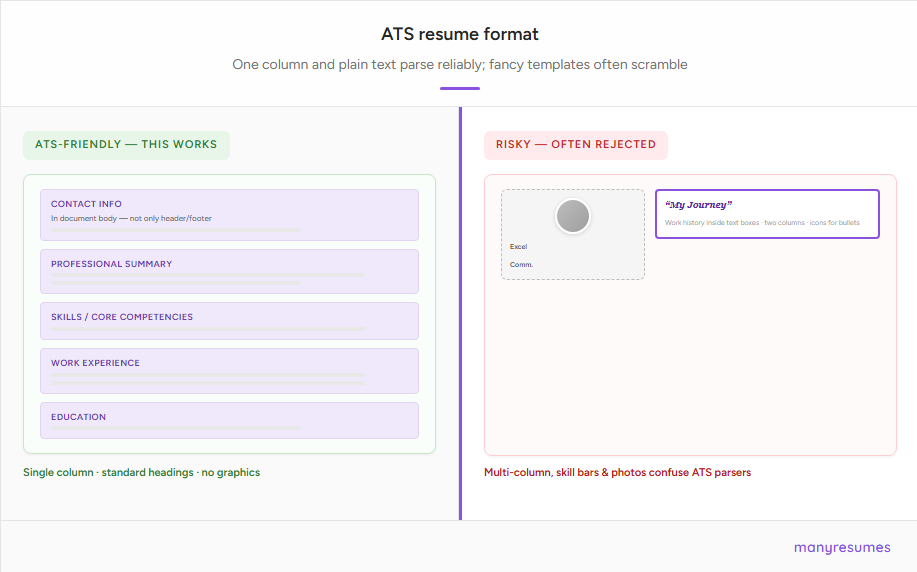
This format looks plain. That’s the point. The ATS does not reward design. It rewards parsability.
The 6 rules of an ATS-friendly resume
1. Use a single-column ATS resume layout
This is the most important formatting rule. Multi-column layouts, tables used for structure, and text boxes look clean to the human eye but are a nightmare for ATS parsers. The software reads left to right, top to bottom. When you break your content into columns, the ATS might scramble the information, reading across both columns at once and mixing up your job titles with your dates.
What to do:
- One column only for the main content
- No text boxes
- No tables for layout purposes (more on this below)
- No headers or footers with important information like your name or phone number. Some ATS software skips header and footer regions entirely
2. Use standard ATS resume section headings
ATS software is trained to recognize specific labels. If you get creative and call your work history “My Journey” or your skills section “What I Bring to the Table,” the system may not know where to put that information.
Use these standard headings:
- Work Experience (or just Experience)
- Education
- Skills
- Certifications
- Summary or Professional Summary
Straightforward is better. The goal is to make the system’s job as simple as possible.
3. Match keywords from the job description
This is where most people fall short. The ATS scores your resume based on how well it matches the job posting. Recruiters then search their database using terms directly from that job description. If your resume uses different words for the same things, you might not appear.
If the job posting says “project management,” your resume should say “project management,” not “managing projects” or “coordinating initiatives.” The phrasing should match.
How to find the right keywords:
Read the job description three times. Highlight the skills, tools, and qualifications that appear more than once. Those are your targets. Weave them naturally into your bullet points, your summary, and your skills section.
Also include both the full term and the acronym the first time you mention something. Write “Search Engine Optimization (SEO)” rather than just “SEO.” Recruiters search both ways.
What NOT to do:
Don’t stuff keywords randomly or repeat them constantly. Modern ATS software can flag unnatural patterns. More importantly, your resume still needs to make sense to a human recruiter after it gets through the filter.
4. Can you use tables in an ATS resume?
This question comes up a lot, and the answer depends on how you use them.
Tables used for layout: never use them. A lot of resume templates use invisible tables to create a two-column structure, put skills in one box and experience in another, or align dates to the right. The ATS parser does not read tables the way a human sees them. It reads cell by cell, which can turn a clean-looking resume into a string of scrambled, out-of-order text. Job titles end up separated from company names. Dates appear in the wrong place. The whole thing becomes unreadable to the system.
Tables used for actual data: generally fine. If you want to display your skills in a neat grid, most modern ATS platforms can handle that without problem. The same goes for a simple two-column certifications list. The rule of thumb: if removing the table would change your resume’s structure, it’s a layout table and you shouldn’t use it. If removing it would only affect how one section’s data looks visually, it’s usually fine.
Safe alternative: just use a single-column plain text list. It parses perfectly every time, on 100% of ATS systems.
5. Use the right ATS resume file format
The safest option for most applications is a text-based PDF or a Word document (.docx).
A text-based PDF means a PDF where the text was created digitally, not scanned from a printed page. If you export your resume from Google Docs or Word as a PDF, that’s text-based and will parse fine. If you photograph your resume or scan it to PDF, the ATS will see an image, not text, and get nothing out of it.
When in doubt, check the job application. If it specifies a format, use that. If not, a .docx file is almost universally supported.
6. Keep fonts and visual formatting clean
Use standard, readable fonts: Arial, Calibri, Georgia, Times New Roman. Font sizes between 10 and 12 points for body text, 14 to 16 for headings.
Avoid:
- Fancy or decorative fonts
- Icons substituting for bullet points (use standard round bullets)
- Colored text for important information
- Graphics, charts, or skill bars. If you have a graphic that shows your “Excel: 90%” bar, the ATS reads nothing from that
Bold and italics are generally fine. Keep them purposeful, not decorative.
ATS resume example: before and after
This is where most guides stop at theory. Here’s what the advice actually looks like in practice.
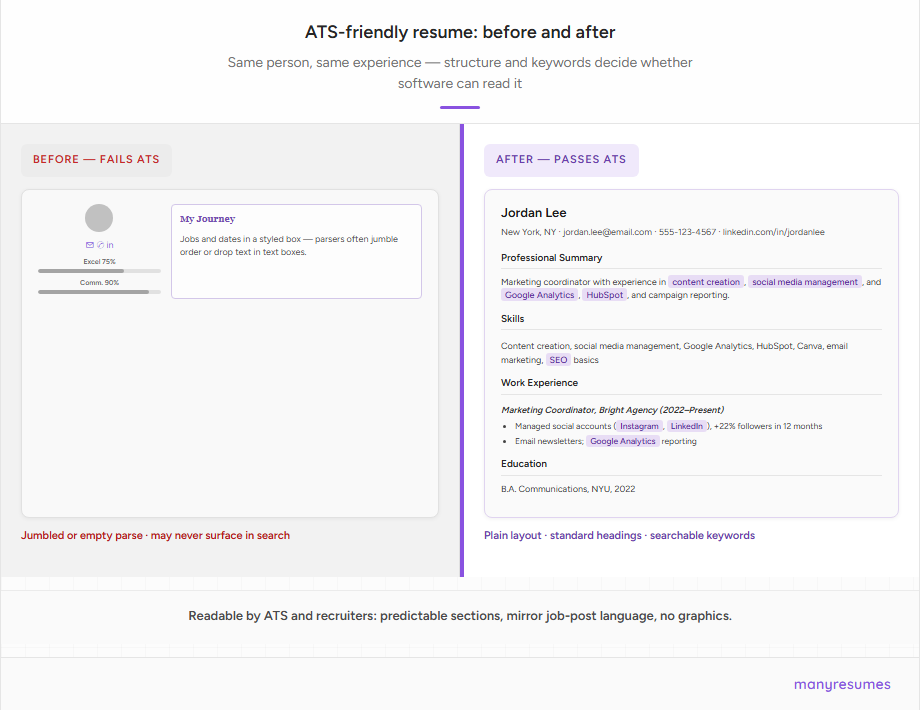
Before (fails ATS)
Typical failing templates combine a photo, skill bars, icons, and a multi-column layout. Applicant tracking systems may read text out of order, drop sections, or see nothing at all if the file is effectively an image.
After (passes ATS)
Jordan Lee
Professional Summary
Detail-oriented marketing coordinator with 2 years of experience in content creation, social media management, and campaign reporting. Proficient in Google Analytics, HubSpot, and Canva. Seeking a marketing role focused on digital growth.
Skills
Content creation, social media management, Google Analytics, HubSpot, Canva, campaign reporting, copywriting, email marketing, SEO basics
Work Experience
Marketing Coordinator, Bright Agency, New York, NY (June 2022 to Present)
- Managed four social media accounts (Instagram, LinkedIn, Twitter, Facebook), growing combined follower count by 22% in 12 months
- Produced weekly email newsletters with an average open rate of 31%, above the 21% industry benchmark
- Tracked campaign performance in Google Analytics and reported monthly to the senior marketing team
Marketing Assistant, Campus Media Group (Sept 2021 to May 2022)
- Assisted with content creation for university social channels, contributing to a 15% increase in student engagement
- Coordinated logistics for 3 campus brand events, reaching over 500 attendees combined
Education
Bachelor of Arts in Communications, New York University, 2022
Plain “after” layout: The Jordan Lee sample above is what an ATS-friendly resume looks like in practice: a clean single-column document with clear section labels, no columns, no icons, and a standard font, readable by both the software and a recruiter.
Notice what this example does: every skill listed in the Skills section mirrors language a recruiter would search for. The bullet points use action verbs, real numbers, and specific tools. The structure is predictable enough that any ATS can parse it cleanly.
How to write ATS-friendly resume bullet points
Your bullet points need to do two things at once: contain the right keywords for the ATS and communicate real impact to a human recruiter.
The formula is simple: action verb + what you did + the result.
Instead of:
Responsible for social media accounts
Write:
Managed three social media accounts (Instagram, Twitter, LinkedIn), growing total follower count by 18% over six months
The second version has keywords (social media, Instagram, Twitter, LinkedIn), shows what you actually did, and shows the result. It works for both the robot and the human.
Use specific numbers where you can. Percentages, dollar amounts, team sizes, time saved. Numbers stand out and they’re almost always keywords that match something in the job description.
One-page vs. two-page resume: what does ATS prefer?
The ATS does not care how long your resume is. It does not penalize two-page resumes. Length only matters to the human recruiter reading it after the ATS passes it through.
For most people under five years of experience, one page is cleaner and easier to read. For people with more experience, two pages is completely fine. Never cram your experience into one page by shrinking the font or removing relevant content just because you heard one page is a rule. It’s not.
The biggest ATS resume mistake most people make
Here’s the honest truth about ATS optimization: the most effective thing you can do is tailor your resume for each specific job. A generic resume will always score lower than one matched to the exact language in the job description. Even two “Marketing Manager” roles at different companies will use different keywords. Your resume needs to reflect that.
This doesn’t mean rewriting from scratch every time. It means adjusting your summary, swapping in the right keywords in your bullet points, and making sure your language mirrors what the posting actually says.
Most people skip this because it takes time. If you’re applying to 20 jobs, that’s 20 versions.
This is the exact problem manyresumes was built to solve. You create your full applicant profile once, then paste in any job description. It generates a tailored, ATS-optimized resume for that specific role in seconds. One profile, unlimited tailored resumes.
ATS resume mistakes that get you filtered out
Using a creative resume template from Canva or similar tools. Most of these use multi-column layouts, text boxes, and embedded fonts that break parsing entirely. They look great in a screenshot. They perform terribly with ATS.
Putting your contact information only in the header. Already covered above, but it’s worth repeating. A significant number of ATS systems skip the header region.
Using photos or graphics to represent skills. Skill bars showing “Python: 80%” communicate nothing to an ATS. Use a plain text skills list.
Spelling out a section as “Professional Work History” instead of “Work Experience.” ATS systems look for known labels. Unusual names for standard sections cause parsing errors.
Using the same resume for every application. This is the most common and most costly mistake. Even a small mismatch in keywords can drop your score significantly.
ATS resume checklist: before you submit
- Single-column layout, no tables for structure, no text boxes
- Contact info in the body of the document, not the header or footer
- Standard section headings (Work Experience, Education, Skills)
- Keywords from the job description woven naturally into bullet points
- Text-based PDF or .docx format
- Standard fonts (Arial, Calibri, Georgia, Times New Roman)
- No graphics, photos, or icon-based bullet points
- Skills section near the top, not the bottom
- Professional summary tailored to the specific role
- Both full terms and acronyms for key skills (e.g., “Project Management Professional (PMP)”)